One of the most common questions I receive from organizations working with highly sensitive information is:
Can we require users to perform MFA before opening a sensitive document?
For many years, the answer has effectively been no.
Entra-based access to encrypted data has always been one of the core strengths of Microsoft Purview Information Protection and Rights Management. It provides strong authentication and access control by ensuring that only authorized users can decrypt and use protected information, and by controlling what they are allowed to do with it after access has been granted.
The historical challenge has not been whether strong controls could be applied to encrypted data in general, but whether organizations could apply unique access requirements to specific categories of highly sensitive information.
How do you ensure that additional security requirements such as MFA, Terms of Use acceptance, approved devices, or even GPS-based location verification are enforced not only when accessing the information, but also when opening a downloaded document?
For organizations with strict regulatory, compliance, or security requirements, this has often been a difficult challenge to solve.
Authentication Context Solved Part of the Problem
When Microsoft introduced Authentication Context, organizations gained the ability to apply Conditional Access policies to specific SharePoint sites.
This allows organizations to require controls such as:
- Multi-Factor Authentication (MFA)
- Terms of Use acceptance
- Approved or compliant devices
- Geographic restrictions
- GPS-based location validation
- Risk-based Conditional Access controls
before users are allowed to access sensitive information stored within a particular SharePoint site.
This is a powerful capability that significantly strengthens access control around sensitive information.
However, there is a limitation.
Authentication Context protects access to the SharePoint site itself.
If users are allowed to download files, those same controls are no longer evaluated when the document is opened locally (or move them to 3-party services).
For organizations with particularly strict security requirements, that creates an important gap.
The Missing Piece
Microsoft recently introduced Extended Protection for SharePoint and Teams.
I previously wrote about the feature in the article: New Feature within SharePoint/Teams Extends Protection of Files
The interesting part is not the feature itself.
The interesting part is what happens when Authentication Context, Conditional Access, and Extended Protection are combined.
Individually, each capability provides valuable protection.
Together, they create a security model that can extend Conditional Access requirements beyond the SharePoint site and into the document access process itself.
How the Solution Works
With Extended Protection enabled, downloaded documents remain connected to their originating SharePoint site.
When a user attempts to open a document, access can be validated against SharePoint before the file is decrypted.
This creates an interesting security flow:
Attempt to open document → SharePoint validation → Authentication Context → Conditional Access → MFA / GPS / Terms of Use → Document decrypted
This means that a downloaded file is no longer relying solely on the permissions that existed at the time it was downloaded.
Instead, access decisions can continue to be based on the current security posture defined by the organization.
Access can effectively be re-evaluated every time the document is opened.
What Value Does This Provide?
For organizations operating under strict security requirements, this introduces several interesting possibilities.
Access to sensitive information can be conditioned on:
- Successful MFA verification
- Physical presence within an approved geographic area
- Acceptance of Terms of Use
- Use of a compliant or managed device
- Additional Conditional Access requirements
If these requirements are not met, access to the document can be denied regardless of where the end user has stored the file, for example, on a local device, in iCloud, Google Drive, or another storage service.
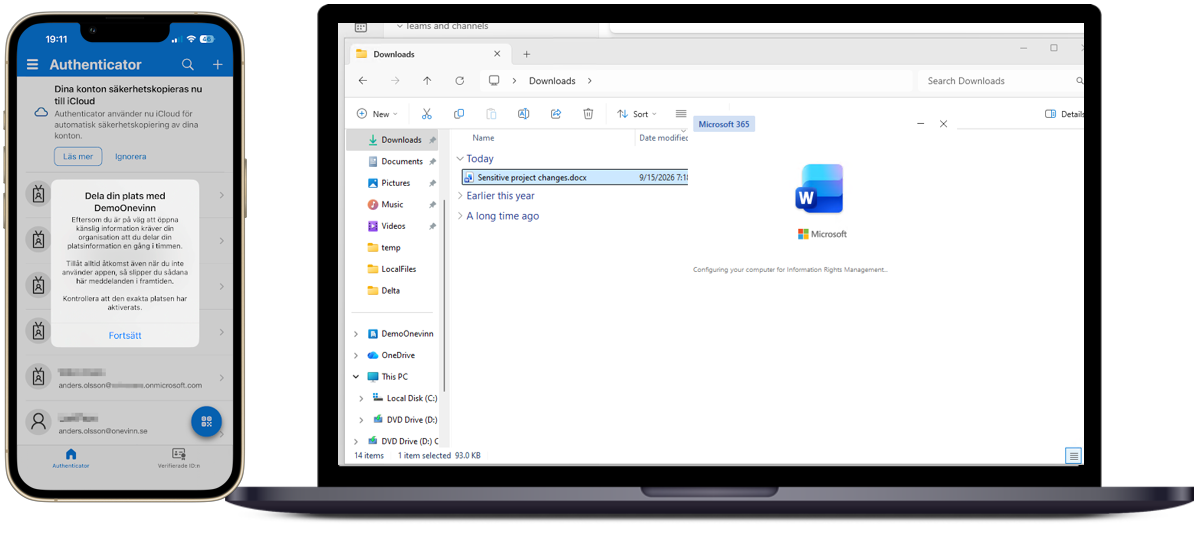
Apologies that parts of the Microsoft Authenticator prompt are shown in Swedish; in this example, the user must share their location (by GPS) and complete MFA before the protected document can be opened.
Summary
For many years, organizations have looked for ways to apply stronger access requirements when users open sensitive documents
Authentication Context addressed part of this challenge by making it possible to apply Conditional Access controls to specific SharePoint sites. Extended Protection adds another important component by helping downloaded documents remain connected to their originating SharePoint location.
Together, these capabilities provide a more flexible way to enforce requirements such as MFA, approved devices, Terms of Use acceptance, geographic restrictions, or location-based validation as part of the document access process.
This does not remove the need for careful design, governance, and testing. However, for organizations that handle highly sensitive information, the combination of these technologies can help address several regulatory and security requirements related to information handling and access to sensitive data.