
When working with Microsoft Purview in real-world environments, one challenge comes up again and again: too much irrelevant data in the logs.
Activity explorer is an invaluable tool for investigations and for understanding how sensitive data moves across endpoints and cloud services. But when the signal is buried under large amounts of noise, it becomes harder to answer the most important questions quickly:
- Is sensitive data actually involved?
- What kind of data is it?
- Which activities matter for the investigation?
This is where Collection Policies provide real value by enabling you to only ingest the data that matters to your organization.
Collection Policies focus on what matters
Collection policies are an event collection and filtering capability in Purview that let you define which events are ingested for analysis. This determines what data becomes available in tools such as Activity Explorer.
By filtering out data that is not relevant to your business context, whether that is activities you do not investigate or sensitive information types that never apply to your organization, the investigation experience becomes much more efficient and predictable.
The scenarios described in this post apply to endpoint events and Copilot experiences. If your tenant also collects data from other workloads such as Exchange, SharePoint, or Teams, excluded Sensitive Information Types will still appear in Activity Explorer for those workloads.
Collection policies do not remove or hide data from other sources, they only affect what is ingested for the scoped locations. They are a foundational design decision and should be treated as part of your long-term data protection strategy.
The problem: irrelevant Sensitive Information Types
In many tenants, Activity Explorer quickly fills up with detections where Sensitive Information Types are incorrectly identified, or correctly detected but still irrelevant because they do not represent any real risk to the business.
A common example is regional identifiers such as, country-specific identifiers
If your organization does not operate in these regions, these detections add little value. They still appear in queries, dashboards, and investigations, which increases the time it takes to identify when sensitive data that actually matters is involved.
Before: noisy Activity explorer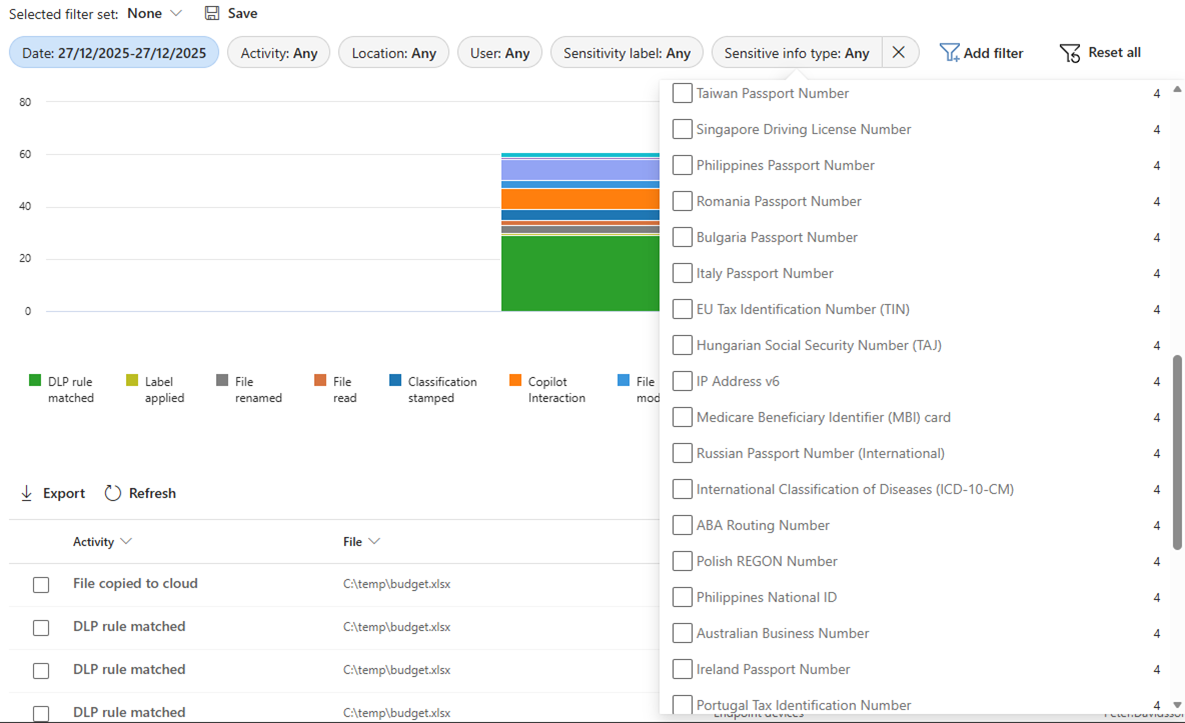
In this view, detections are dominated by a mix of false positives and data types that, while sometimes correctly identified, are not relevant to the business and add unnecessary noise to investigations.
Reducing SIT noise with Collection Policies
With collection policies, you can explicitly control which classifiers (including SITs) Purview evaluates when events are ingested.
In this scenario:
- All classifiers were enabled
- Specific built-in SITs with no business relevance were excluded
The intention was simple. If a data type is not meaningful for investigations or compliance, it should not consume attention in Activity explorer.
Collection policy configuration (SITs)
An important design consideration for future DLP rules
One important aspect to be aware of is how collection policies affect future DLP configurations.
Events that are filtered out by a collection policy are never ingested into Purview and therefore are not visible in Activity Explorer or other analysis tools. Since those events do not exist in the Purview analysis store, DLP rules will not have any matching data to evaluate for those excluded types.
In practice, this means:
- Only exclude SITs that you are confident will never be needed for investigations or DLP enforcement
- Collection policies should be treated as a foundational design decision, not a tactical filter
Used correctly, this strengthens your overall data protection posture. Used without planning, it can limit future detection scenarios.
The result: clearer signals in investigations
After introducing the collection policy, the difference in Activity explorer is immediate.
After: focused Activity explorer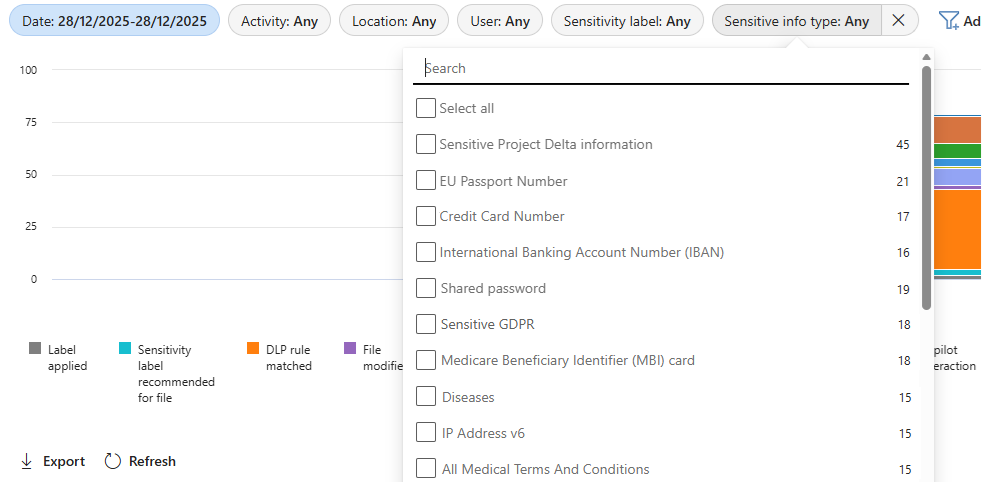
When sensitive data appears in the logs:
- It is more likely to be relevant
- Patterns are easier to identify
- Investigations move faster
This is especially valuable during incident response, where time matters and analysts need to quickly determine whether sensitive data is involved.
Reducing activity noise by removing high-volume events
Sensitive information types are only one part of the noise problem. Activities matter just as much.
Some activities generate large volumes of events but add little investigative value. A common example is Archive created and File archive activities on endpoints, which can quickly dominate Activity explorer when files are compressed or collected from a device.
By adjusting the collection policy to exclude these activities from ingestion:
- Logs become easier to navigate
- Timelines become clearer
- Focus stays on activities that are more likely to indicate data exposure
Before: noisy Activity explorer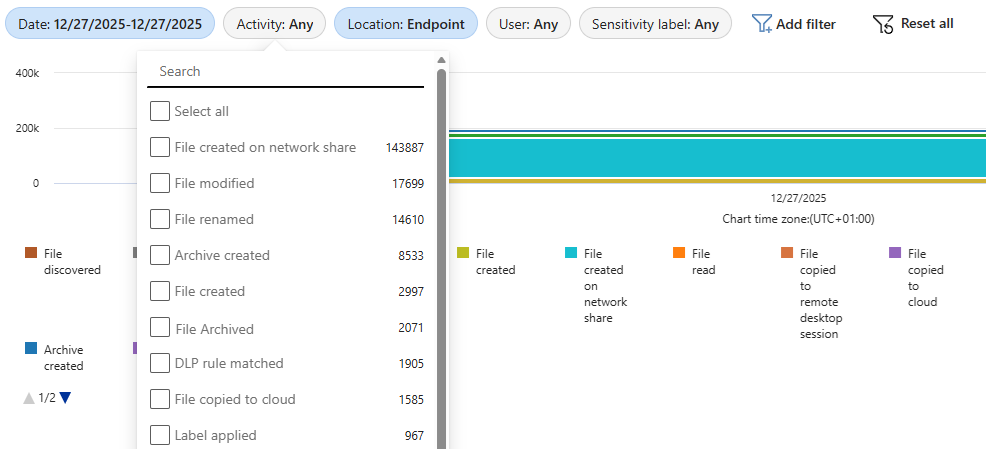
Collection policy configuration (Activities)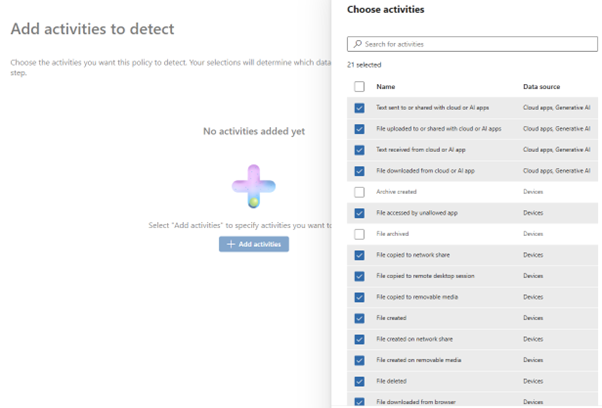
Result in Activity explorer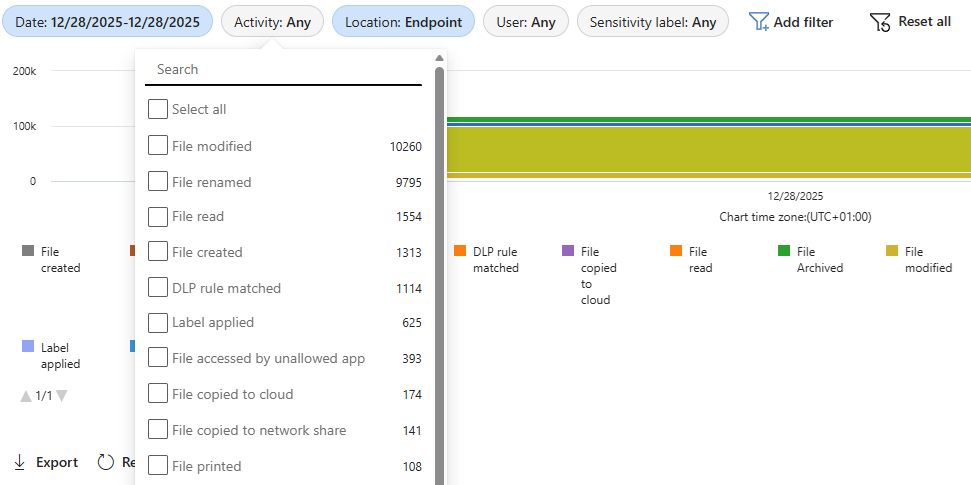
Why this matters in real investigations
Reducing noise is not about making logs smaller. It is about making decisions faster.
When irrelevant SITs and high-volume activities are removed at the collection stage:
- Analysts can more quickly confirm whether sensitive data is involved
- Investigations become more consistent and repeatable
- Activity explorer becomes a practical investigation tool instead of a data dump
This leads to less time spent filtering and more time spent understanding what actually happened.
Final thoughts
Collection policies are often treated as a technical detail. In practice, they are a strategic control that shapes what data protection is possible later on.
They help:
- Reduce noise and improve investigation quality
- Make Activity explorer faster and more actionable
- Focus analysts on data that truly matters to the business
At the same time, collection policies define what data is available at all. Excluding Sensitive Information Types or activities is not just a visibility decision, it is a long-term design choice.
For that reason, it is critical to:
- Clearly document why each collection policy exists
- Record which SITs and activities are intentionally excluded
- Align collection policies with compliance, legal, and security stakeholders
Well-documented collection policies make investigations faster, detections clearer, and future changes safer.
Learn more
For a deeper understanding of how collection policies work and how they influence data ingestion in Microsoft Purview, see the official documentation:
https://learn.microsoft.com/en-us/purview/collection-policies-solution-overview

 IT-Säkerhetsguiden
Tack Anders för en väldigt bra och lättförståelig artikel 🙂