
AI tools are now part of our daily workflows. Whether you’re writing an email, summarizing meeting notes, or drafting a company announcement—services like ChatGPT, Copilot and others make things easier and faster.
But with speed comes new risk.
In a moment of copy-paste, users can easily include things they didn’t mean to share—like the actual prompt they used to get the AI to generate the message in the first place.
And that can affect more than just the message itself—it can impact how your organization is perceived.
The Invisible Risk
Let’s say an employee is drafting a kind message to a sick colleague, and wants to include a summer greeting. They open ChatGPT and ask:
”Can you write a friendly and supportive email to a colleague who is out sick? End with a warm summer wish.”
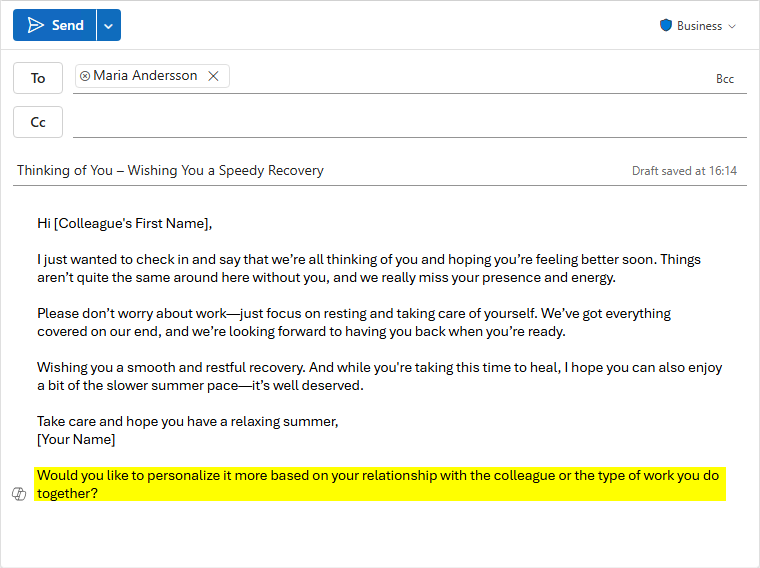
The response is great. The user copies and pastes it into Outlook—but in the rush, they include more than just the actual message. At the end of the AI-generated response, there’s a follow-up suggestion added by the assistant:
”Would you like to personalize it more based on your relationship with the colleague or the type of work you do together?”
That follow-up, meant to guide further refinement, ends up in the email by mistake.
It’s a small slip, but the signal it sends is loud: this was written by AI, and the sender didn’t fully review it.
Why That Matters
These types of AI artefacts—leftover instructions, editing suggestions, or prompt fragments—can give the impression of carelessness or over-reliance on automation. In the wrong context, they can be:
- Embarrassing
- Confusing to the recipient
- Damaging to brand perception
Especially in industries built on trust, credibility, and personal relationships, that’s not a risk you want to take lightly.
Helping the User Catch It – Before It’s Sent
This is where Data Loss Prevention (DLP) steps in—not just as a compliance tool, but as a guardian of tone and quality.
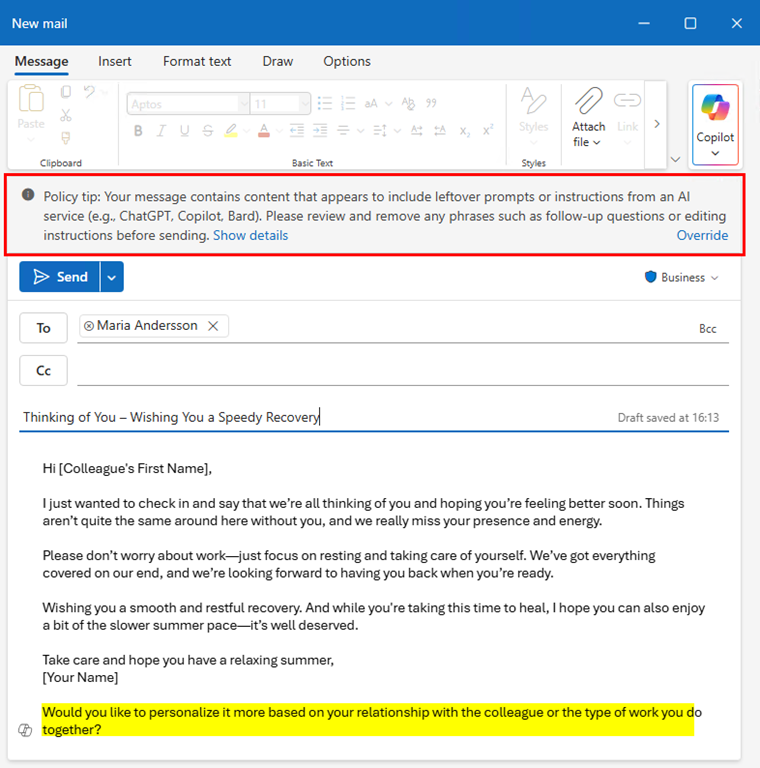
When a user pastes content that includes clear signs of leftover AI prompts, DLP can gently intervene. The user sees a clear message, like:
“Your message contains content that appears to include leftover prompts or instructions from an AI service (e.g., ChatGPT, Copilot, Bard). Please review and remove any phrases such as follow-up questions or editing instructions (e.g., ”Would you like me to rewrite this more formally?”) before sending.”
This short moment gives the sender a chance to stop, think, and fix the issue—before the email leaves their outbox.
A Realistic Example – and What It Prevents
In a short video I’ve included below, you’ll see exactly how this plays out.
An employee uses AI to draft a heartfelt message to a colleague who’s out sick. The message includes warm wishes and a summer greeting—but also includes a prompt leftover asking if the tone should be made more personal. DLP detects the issue and blocks the email before it’s sent externally.
The result? The user is made aware, they clean up the message, and the recipient receives a thoughtful note—without any trace of behind-the-scenes AI assistance.
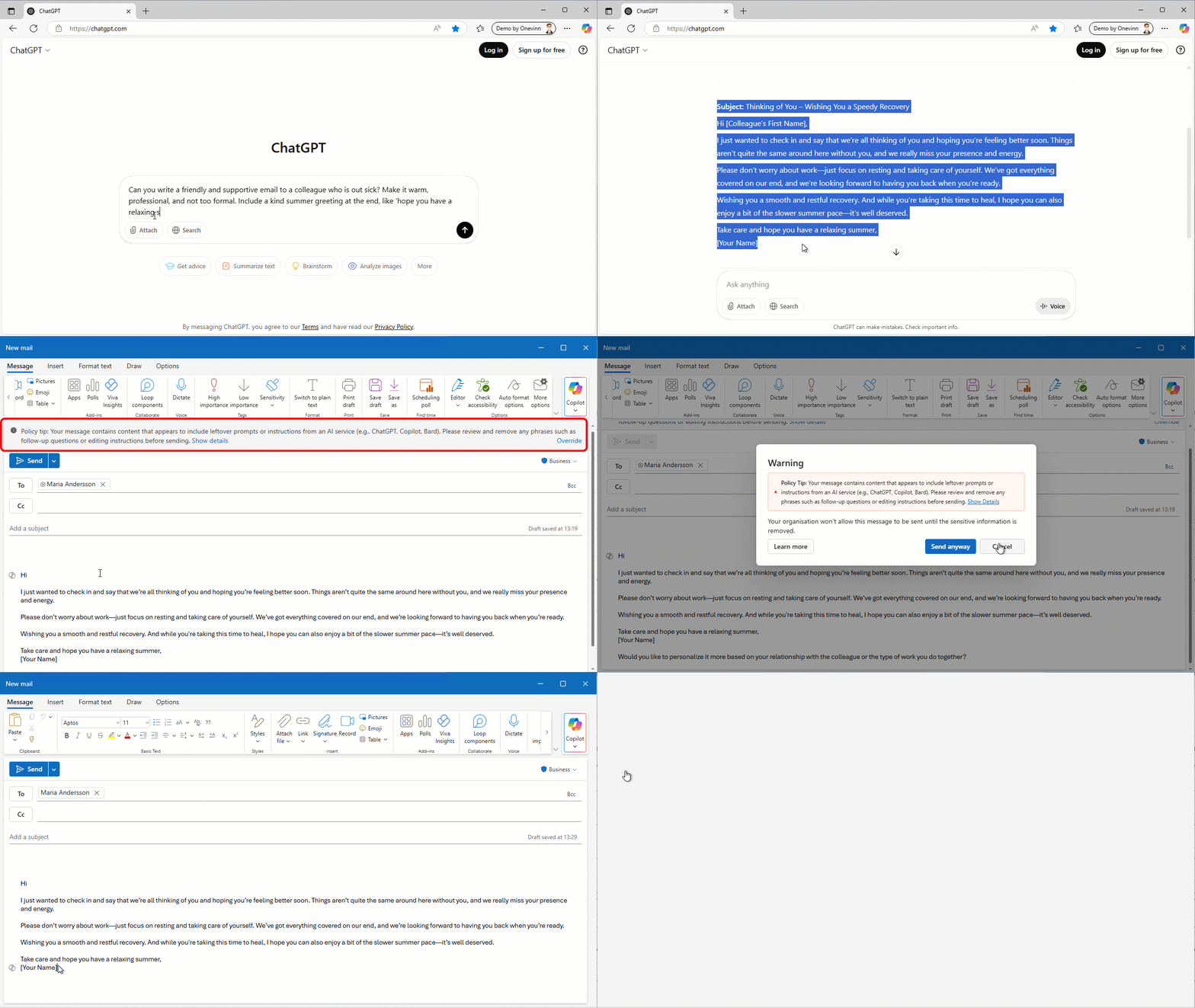
To view the video in its intended format and best quality, click to play.
It’s Not About Blocking AI – It’s About Guiding Its Use
AI is here to stay, and rightly so. It helps us move faster, communicate better, and work smarter.
But as organizations, we also have a responsibility to protect our tone, our professionalism, and our brand voice. DLP gives us a lightweight, invisible safety net—one that ensures what leaves our organization reflects the intent, not the tool behind it.
As you’ll see clearly in the video, the user is working with Microsoft Copilot—which is by far the best way to reduce this kind of risk. With Copilot, users don’t need to copy and paste between tools. Content flows directly into Outlook or Word with context, formatting, and tone built in.
Still, even with Copilot, a little guidance can go a long way. Some AI-generated suggestions or prompts can still sneak in depending on how users interact with the assistant.
That’s why a combination of smart AI and supportive DLP is key—not to block creativity, but to help your people communicate clearly, confidently, and on-brand.

 IT-Säkerhetsguiden