
Did you know that the majority of data breaches occur due to improper access controls? In an age where data breaches are more frequent, managing sensitive information securely while ensuring its accessibility is more critical than ever. Organizations often struggle to strike this delicate balance. Microsoft is introducing a new feature in SharePoint that simplifies protecting files, ensuring that it is easy to protect files throughout their entire lifecycle, even after they have been downloaded.
When working with sensitive data, it is crucial to ensure:
- Accessibility: Information must be available to authorized personnel.
- Confidentiality: Only the right individuals should have access.
- Integrity: Information must be reliable and accurate.
For nearly 30 years, Rights Management Services (RMS) has allowed encryption and rights control for Office files. This ensures only authorized individuals, groups, or domains can access and work on documents like Word files.
Examples of Rights Control:
- The management team can create, modify, and share sensitive information.
- An external advisor can edit the information but cannot copy, share, or print it.
- The rest of the organization can only view the information.
This approach ensures both confidentiality and integrity of the data.
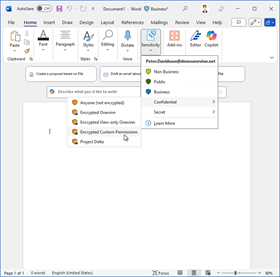
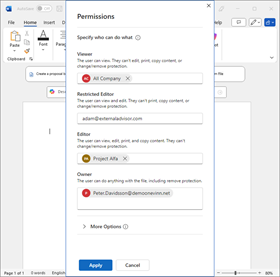
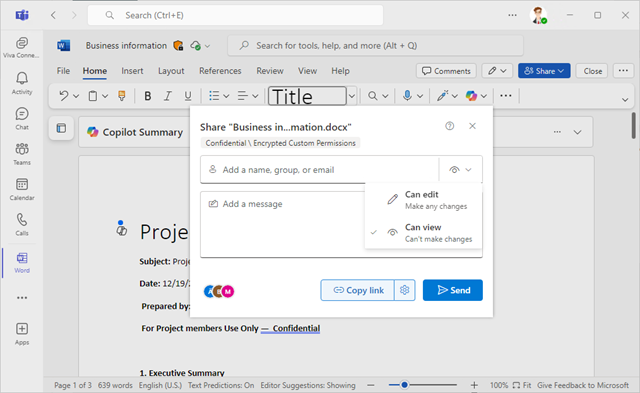
With RMS Custom Permission, users can define document permissions themselves. The image above shows the new modern interface available in M365 Enterprise starting with version 2412.
Modernizing Accessibility
Previously, these files required Microsoft Word to open, which limited accessibility. This can now be addressed by sharing files via SharePoint, OneDrive, or Teams. Files can then be opened in Teams or Word Online, which only require a browser to increase the accessibility.
Support includes both Office files and PDFs. Administrators can manually configure who can download files or open them in local applications for editing. Encryption and rights control always follow the files, ensuring confidentiality and integrity.
The biggest challenge lies in educating users about labeling, encryption, and SharePoint permissions to ensure proper tool usage. This places significant demands on users and requires manual effort.
New Feature: ”Extend protection on unencrypted files…”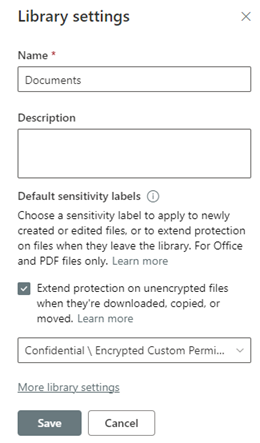
Microsoft is currently rolling out a feature in SharePoint that allows organizations to easily set up required permissions via SharePoint/Teams settings.
The SharePoint site or team owner can configure “Library settings” with the new “Extend protection on unencrypted files” feature and select which sensitivity label will apply to all files created or moved to that site skrivor team. This utilizes the same sensitivity label as in the example above with “user-defined permission.”
After this configuration, access and permissions for files in this library will inherit the rights from the respective SharePoint site.
- Files created or saved to this library automatically receive the selected sensitivity label.
- Existing or uploaded files already protected will retain their current sensitivity label and permissions.
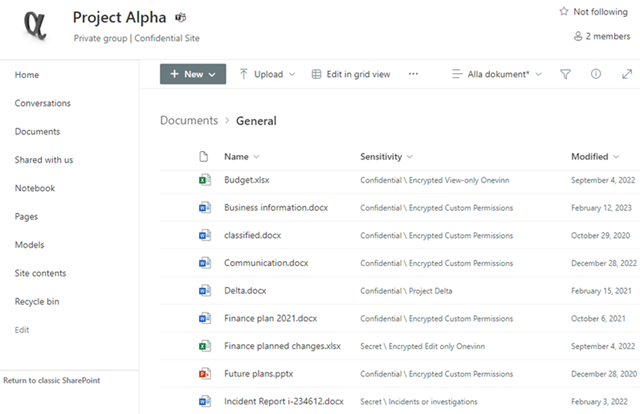
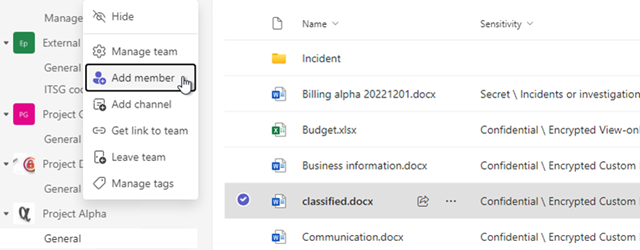
The owner can easily manage file access by inviting members or sharing existing files. The protection extends to files that is allowed to be downloaded.
Enhanced Protection Against Copying and Moving
Files with this sensitivity label are subject to additional restrictions regarding copying and moving:
- Files cannot be copied or moved to another site.
- Files can only be copied or moved within the same site if the user has permission to create or delete lists in SharePoint.
This ensures sensitive information remains in the correct context, minimizing accidental or unauthorized data exposure.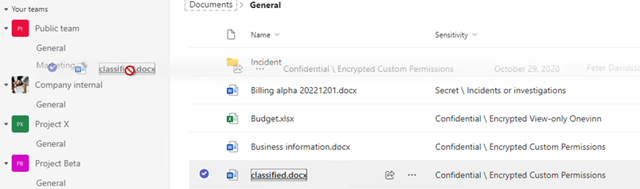
The above image shows that a user cannot move a file to another team.
Just-in-Time Protection for Downloaded Files
With dynamic access control and revoked protection, users cannot open previously downloaded copies of protected files if their permissions change or the file’s status in SharePoint is updated.
Dynamic Access Control: If a user’s access to a file is revoked in SharePoint, such as by a site owner or administrator, the user cannot open previously downloaded copies.
Revoked Protection: Downloaded file copies become inaccessible if:
- The file is deleted from SharePoint by an authorized user, such as a site owner.
- The file is moved to another site by an authorized user.
- The site where the file is stored becomes inactive.
Automatic Synchronization of Permissions: Any changes to SharePoint permissions for a specific file, whether made by an administrator or a site owner, are immediately reflected on all previously downloaded copies.
This feature provides organizations with a robust way to protect their information using custom permissions that can be easily modified or removed.
Thanks to this technology, high accessibility is also ensured, as files can be opened and edited through any browser or locally installed M365 applications.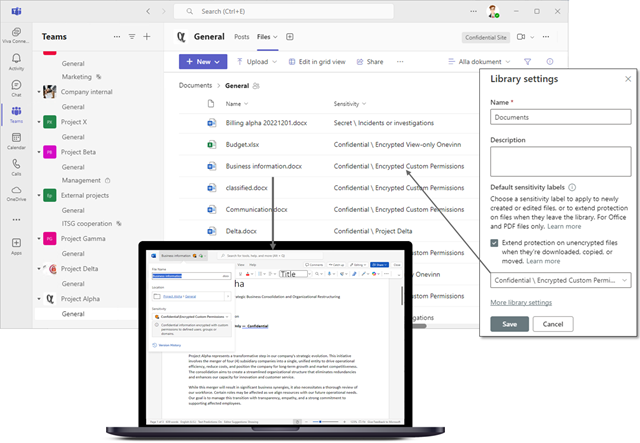
The requirement for locally installed applications is Microsoft 365 Apps for Enterprise, version 2402 or later.
Note: This is a new technology currently in preview. Always verify functionality before deploying it in production.
For more information on getting started and required prerequisites, please visit this learn-article.

 IT-Säkerhetsguiden